|
The Insider TA™ demo includes much of the functionality of the
Professional version, but is limited to working with the supplied demo data files.
After installing, you might want to follow the steps outlined in our
Demo Help page. (Please note that some web pages will
still reflect the older v7.0 software. Updates will be made shortly!)
|

|
File to download:
|
|
File size:
|
28,722,031 bytes
|
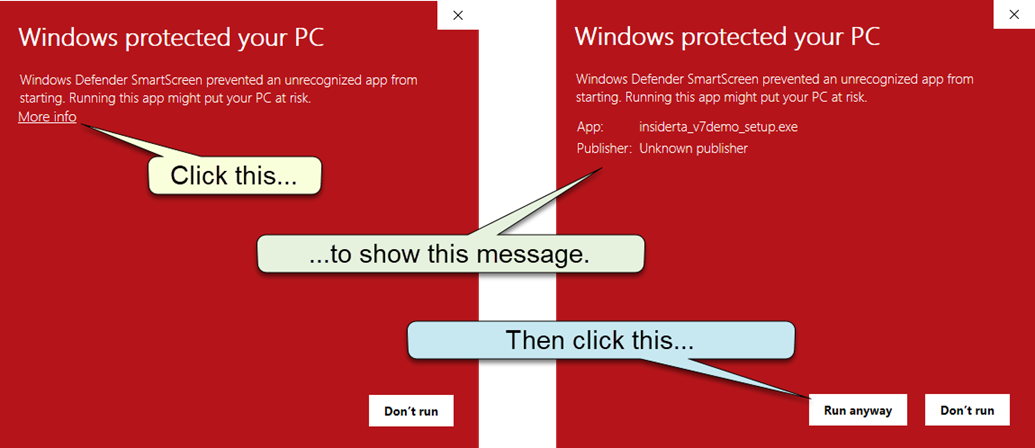
Windows Smartscreen popup dialog:
Windows may pop up the following dialog when attempting to run the above setup program.
There is no need for concern if you see this dialog. Just follow the steps shown in the callouts below:
(Although we don't recommend it, here is a
Youtube video
on how to disable the Windows Smartscreen filter. The filter serves a purpose, but certainly
is misleading when you attempt to install legitimate software.)
After the demo program is installed, please note the following:
- ITA Version 7.5 Professional and Standard, like it's predecessors,
implements a periodic License Validation process. We refer to this as checking-in,
and it is a process that utilizes your Internet connection. Check-in's are
not required for the demo program, but there is a test facility accessible
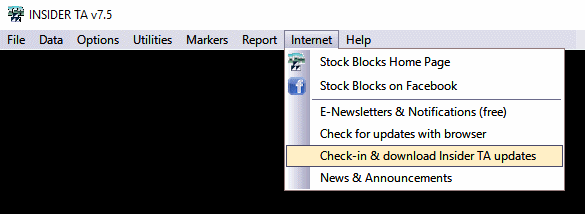
from the top menu line that demonstrates it (click Internet,
then select "Check-in and download Insider TA updates", as shown
here...
- Insider TA has an Internet
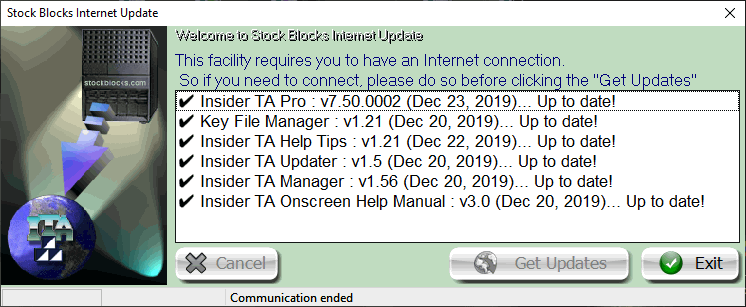
Update facility that allows you to update it to the latest build. You
will be presented with this option after responding Yes or No to
the check-in prompt discussed above. Feel free to perform
an Internet Update every week or so, because many fixes and/or enhancements
may still be implemented in the near future.
- The demo software is supplied with read-only data
files for you to evaluate Insider TA with. This includes the scanning
process.
- The ASCII File Downloader is a new feature in version 7.5. In the Insider TA Demo edition,
various features of the ASCII Downloader are operational except for the downloading
of any CSV data files.
- All this and more is discussed in greater detail in the online help guide.
See the comparison grid to learn the differences
between Insider TA Professional and Standard editions.
We hope you enjoy using this demo software, and if you have any problems
or questions, please email us.
Regards,
- Stock Blocks, Inc.
|




