Overview
Insider TA™ by Stock Blocks Inc®
is a technical analysis program for Windows 11/10. This page provides a brief overview on
Insider TA's analysis methods and interactive environment. It's interface and method of
data presentation is unique, and as such we hope it will compliment your existing set of investment tools.
A good overview on Insider TA's concepts and functionality can also
be found in various program reviews (the
first one published in June 1996) by Technical Analysis of STOCKS & COMMODITIES magazine.
The latest of these reviews is in their November 1999 issue.
Insider TA Professional and Standard edition can
download free ASCII data from Alpha Vantage.
This utility is fully documented in the help documentation that is provided with the Insider TA demo software.
After installing, open up the help and search for ASCII File Downloader.
Insider TA v7.52 is the final major release of the software and is designated the
Farewell Edition. Although no further feature-line versions will be introduced,
maintenance updates to this final release may continue to be made available through the
Internet Update Utility as needed.
Back to top
Equivolume Charting
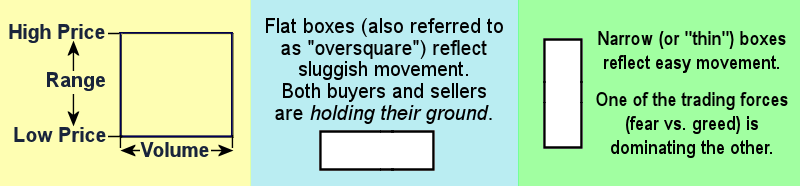
Price Range and Volume reflects the box shape
Insider TA's charting technique embraces Equivolume Charting
where each trading period's high price, low price, and volume define the plotting
coordinates of a box. Sometimes referred to as "box charting" in our documentation,
this innovative technique is the creation of Richard W. Arms.
When plotted using this method, the resulting graph reveals a chain
of boxes with varying shapes. The shapes, which are quantified by the
boxes' height-to-width ratio, are viewed as significant forecasting signals.
 Equivolume charting, or "box charting", was never thoroughly exercised in other software packages, simply because
the vertical and horizontal graph scales were always constrained to
fixed scaling. Insider TA breaks this barrier and exploits the concept
of box charting by allowing you to flex the plotting scales
through its interactive viewport. The ability to pan, zoom,
stretch, and compress the charts in real-time (that is, without the
need to pull down a menu for redefining new plotting parameters) is one
of Insider TA's more popular features. Once you get accustomed to Equivolume charting, you may find it to be your preferred viewing environment. Other
volume-based indicators, like Insider TA's Box Analyzer
and VA Rank functions (discussed below), can then be used
to search for potential buy and sell points. Equivolume charting, or "box charting", was never thoroughly exercised in other software packages, simply because
the vertical and horizontal graph scales were always constrained to
fixed scaling. Insider TA breaks this barrier and exploits the concept
of box charting by allowing you to flex the plotting scales
through its interactive viewport. The ability to pan, zoom,
stretch, and compress the charts in real-time (that is, without the
need to pull down a menu for redefining new plotting parameters) is one
of Insider TA's more popular features. Once you get accustomed to Equivolume charting, you may find it to be your preferred viewing environment. Other
volume-based indicators, like Insider TA's Box Analyzer
and VA Rank functions (discussed below), can then be used
to search for potential buy and sell points.
Back to top
Box Analyzer (BA)
Box Charting relies on our cognitive ability to pick out trends in box
shapes. This often becomes difficult, primarily due to the sometimes
erratic fluctuations a stock may travel on a day-to-day basis. To aid
in this task, and based on Richard Arm's Ease of Movement (EMV) analysis, Insider
TA has a Box Analyzer (BA) function which provides insight
on how the box shapes are trending. The output of this numerical-based
trend analysis is plotted in an independent BA Graph window. Insider
TA produces "buy" and "sell" tags that signals when the box shapes
begin to trend in a way that may indicate a reverse in price movement.
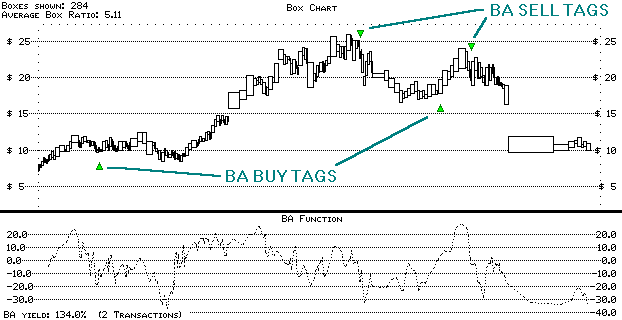
Vtel Corp (Daily: 12/13/94-1/12/96)
The above example illustrates how the BA Function can filter
the seemingly chaotic behavior of box shapes, and reveal trends that
could not have been detected otherwise. Two very well-placed BA buy/sell
tags have been calculated, all based exclusively on past behavior.
When using the BA Function, we look for an overall consistency
in the accuracy of multiple BA buy/sell pairs in a box chart. If they
are well placed, as shown above, then we have a better chance of accurate
hit rates for future buy and sell tags.
Back to top
Volume Analyzer (VA)
Insider TA's Volume Analyzer (VA) stems from the concept of On-Balance
Volume, or OBV. This is a simple accumulator function that
counts volume based on up and down days. Introduced by Joseph
Granville, OBV uses closing price for determining up/down
days. Insider TA's implementation modifies this concept... assuming
that the "closing" price is merely an instant in time, with no inherent
significance, the up/down volume accumulation is better calculated
by basing it on the price midpoint, or the average of the high and
low for the day.
The VA, like the OBV, assumes ALL volume on any given day was either
up or down, depending on the midpoint price move. A more precise approach
would involve detailed analysis on volume/price performance throughout
the day, commonly referred to as the Cumulative Volume Index, or CVI.
Unfortunately (or fortunately perhaps, for simplicity sake!), stock listings
only provide the high and low, so taking a simple average is our best
approach.
Simply put, the Volume Analyzer function is a rough measure of
the demand for a stock. We quantify the plotted VA Line by calculating
the "Up Volume to Down Volume" ratio, or UV/DV. As in the VA calculation,
this is based on price midpoint and not the closing price. UV/DV ratios
greater than 1 signify an inclining VA Line; less than 1 signify a declining
VA Line. One of our primary tenets is to buy (long) a stock only if the
VA line is on an incline (UV/DV > 1.0).
Back to top
VA Rank Function
Insider TA extends the VA concept with an additional function
that measures the relationship between a stock's price and its corresponding
VA level. Large gaps between the Price line and VA line are given high "ranks",
and may signal possible "buy" points. Small gaps are given lower "ranks",
and may signal possible "sell" points. The VA
Rank Function plots these rank values in a separate graph. Observe
the data for DSP Technology (ticker DSPT) in the following graph...
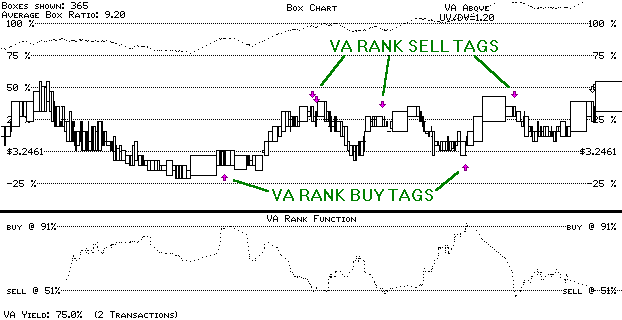
DSP Technology (Daily: 7/16/93 - 11/30/94)
The resulting peaks and valleys observed in the VA Rank function reflect
possible "buy" and "sell" points. By positioning the two horizontal lines
(shown above as "BUY @ 91%" and "SELL @ 51%" in the VA RANK FUNCTION
window) so that they pierce the major peaks and valleys in the VA Rank
Function, we arrive at some pretty accurate buy/sell tags.
Back to top
Consolidation Mapping
Box charting's visual presentation of data causes a person to mentally
combine ideas, data, and information in a totally unexpected way. The
symmetry that arises when plotting along a volume scale offers a means
to examine and evaluate information not attainable by other charting
methods. Consolidation markers help to map these symmetrical regions.
When viewed in a box chart, consolidation periods are marked by a horizontal
band of boxes within a fairly constant price range. Boxes in these areas
will generally be "flat" in shape (i.e., shorter and wider), reflecting larger volume because the
buyers and sellers are executing their trades with little resistance.
In some cases, after all interested parties have fulfilled their desires
(of either acquiring or ridding their shares), volume tends to diminish.
This point in consolidation may signal an impending move, but wait further
until you see which direction.
When boxes begin to diverge from a consolidation period, increased trading
activity (sometimes more of a frenzy) stimulated by the forces of fear and greed begins
to drive a stock price to new levels. Based on Arms' theory, this is
where consolidation mapping comes into play: Relying on the assumption
that all traders who bought shares during the consolidation period are
now selling (either to take profits, or diminish losses), we can deduce
that the sum of all shares involved in the consolidation period will
approximately equal the sum of shares involved in the price move.
Since box charting is plotted on a volume scale, it follows that the
horizontal distance of the consolidation period will approximately equal
the distance of the move. Observe the following example of Federal Express.
Here, we defined a consolidation period from 5/5/95 to 7/24/95 (Box #380).
Insider TA mapped out an equidistant range from 7/24/95, and successfully
placed a marker at the end of the price advance (11/6/95). Had we performed
this analysis shortly after 7/24/95, we would have had a significant
indicator on when to sell Federal Express.
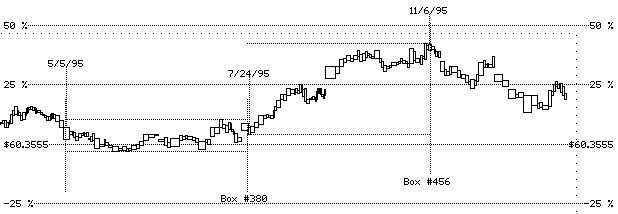
Federal Express (Daily: 10/4/94 - 1/12/96)
Note that consolidation mapping cannot predict how high or low a stock
will advance. Instead, it can be an effective tool in timing the duration
of a stock's move. Insider TA allows you to insert up to three
consolidation periods (actually 30, because you can define up to 10 views)
in your viewport. By drawing out what you believe is the consolidation
period, Insider TA will show an equally distanced period to its
immediate right, in effect "mapping" out how far the projected price
advance should progress.
Back to top
Candlestick Charting
Candlestick charting is supported by Insider TA, provided your
stock data includes Open and Close price
on top of the minimum requirements of High, Low,
and Volume. Candlestick plotting is not a volume-oriented
method of analysis, but some prefer it's graphical presentation over
box charting, so we have included this option.
Back to top
Candlevolume Charting
Insider TA can generate box charts with candlestick-styled characteristics. The
result is known as Candlevolume charting, and is quite popular
for those who want the best of both worlds. In this mode, a traditional
candlestick chart is drawn with each candle's width reflecting the volume
for that day. This feature is toggled on/off by pressing Control
V on the keyboard.
Back to top
Point & Figure Charting
Ok, so Point & Figure charting isn't a volume-oriented analysis
technique. But it's uniqueness and popularity in the technical
analysis community has made it a good addition for Insider TA's toolbox.
Refer to the handling of Point & Figure in
Insider TA.
Back to top
Data Compatibility
Back to top
Recommended Reading
Insider TA's box charting principles is based on Richard Arms' Equivolume charting
techniques. For more information on this topic, we recommend
you read his book, titled
Profits in Volume - Equivolume Charting
 . .
Another book we recommend by Equivolume Charting expert Richard Arms is
Trading Without Fear
.
Point & Figure charting is covered quite well in a book by Thomas J. Dorsey, titled
Point and Figure Charting - The Essential Application for Forecasting and Tracking Market Prices
.
Back to top
Variations
Insider TA is available in two levels: Standard and Professional.
For a side-by-side comparison and current prices, please refer to this
page.
Back to top
|


 .
.

