NOTE: This page refers to Insider TA versions 6.0 and earlier. The latest Insider TA version
no longer uses the Borland Database Engine, hence this page does not apply.
Insider TA creates and maintains
a special database called the View Database (refer to your Users
Manual, or in the online help guide).
If you inadvertantly shut down your
computer while Insider TA is updating the View Database, its contents
might get corrupted. In these situations, you can use the View Database
"Cleanup/Auditing" tool to attempt fixing any problems. However,
there are rare cases when even the Cleanup/Auditing tool will not correct
the error(s)! So what you will need to do is delete the View Database
altogether. IMPORTANT: Only attempt to do this when Insider TA is
not running.
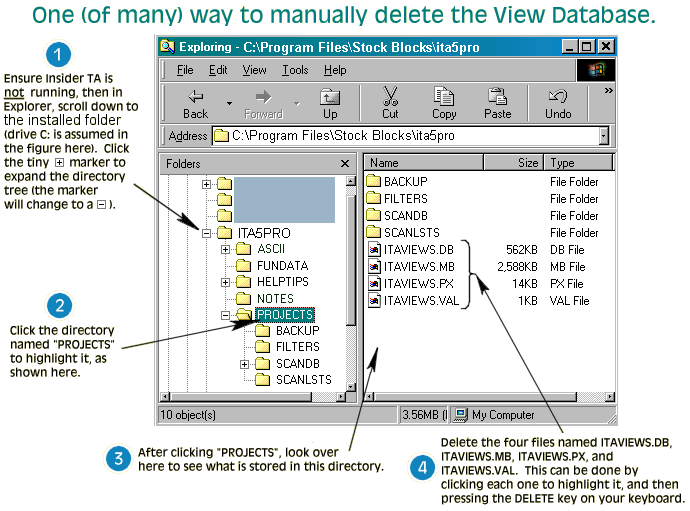
There are many ways to delete the
View Database. In a nutshell, you simply need to delete all the ITAVIEWS.*
files in Insider TA's \PROJECTS subdirectory (typically, this is
C:\Program Files\Stock Blocks\ita5pro\projects).
Here's one way of doing this, using
Windows Explorer...
|



