|
The tutorials provide some quick views of Insider TA™ in action.
Don't expect to see a Hollywood production here! Nonetheless, they
should provide a helpful glimpse on how Insider TA can be interacted
with.
All of the tutorials incorporate
audio, so you'll need to have your speakers on when playing them.
We
have included the necessary software to allow playback, so there are
no further requirements to be concerned with.
Although not necessary, we recommend you install
the tutorials after installing the demo
software.
Note the large size of the download! This is why it's not included
in the demo version setup. We recommend you attempt the following download
only if you have a broadband connection.
(Link disabled)
After downloading, follow these simple instructions:
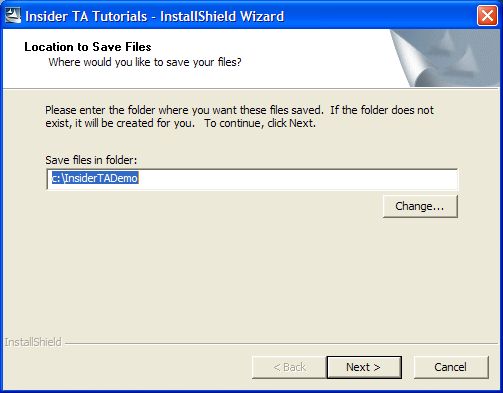
- You will first be prompted for a location. The folder shown below
(C:\InsiderTADemo) is the location that our demo software
is installed into. So unless you deviate from that location when installing
the demo software, keep the following
selection as-is.
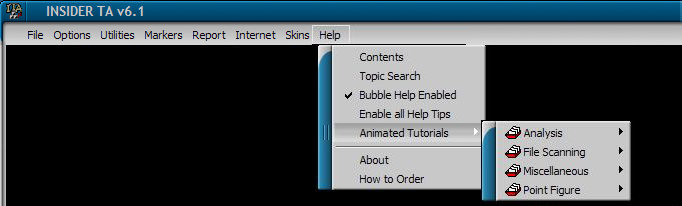
- After the tutorials have been installed, startup the Insider TA demo!
Then pull down the Help menu option, and observe the various tutorial
categories in the submenu. If the "Animated Tutorials" option
is disabled, then you did not install the tutorials to the correct
location.
See the comparison grid to learn the differences
between Insider TA Professional and Standard editions.
NOTE:
The tutorials were recorded before Insider TA Version 6.1, but the
principles still apply to the latest software. Because Insider TA's
interface implements customizable "skins", be aware that
the views you see in the tutorial will not match the look of
Version 6.1. But all the various button and menu locations demonstrated
are still the same.
We hope you enjoy these tutorials, and if you have any problems or questions,
please email us.
Regards,
- Stock Blocks
|



